A Spiritual Heir to the Macintosh
Table of Contents
A Spiritual Heir to the Macintosh
by Ezra Shapiro
from the October 1987 issue of Byte
The Canon Cat may be Jef Raskin’s long-sought “information appliance”
Editor’s note: The following is a BYTE product preview. It is not a review. We provide an advance look at this new product because we feel it is significant.
The Canon Cat is being advertised as a piece of office equipment-the next step beyond the memory typewriter-but there’s some real computer muscle under this feline’s skin. It’s JefRaskin’s first machine since he left Apple, where he headed the original Macintosh development team., And, as you might expect from this pedigree, the Cat takes an innovative approach to computing in the business environment.
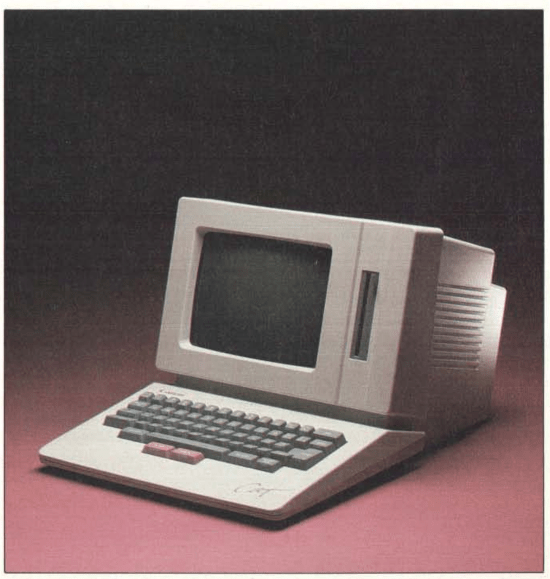
Like the Macintosh, the Cat is a onepiece unit with a 9-inch black-and-white bit-mapped monitor, a single 31h-inch floppy disk drive, a small footprint, a Motorola 68000 CPU, and a user interface built into ROM. However, that’s where the similarity ends; the Cat has no mouse, no icons, and no graphics.
Raskin’s goal at Apple had been to create a low-cost, minimalist “people’s computer.” However, as the Macintosh evolved into a product, it grew in scope, complexity, and cost. A year after his departure from Apple in 1982, Raskin founded a small company and began to design a machine that would recapture his original vision; he named the firm Information Appliance, a rather succinct statement of his utilitarian philosophy.
The company is still going strong. The Canon Cat is a refinement of the prototypes developed by Raskin and his coworkers at Information Appliance and is now being manufactured and sold by Canon U.S.A. under a series oftechnology licenses.
At First Glance
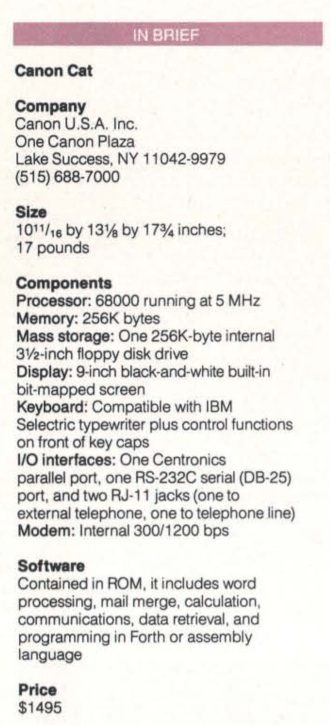
The 17-pound Cat takes about as much space as an Apple IIc with a monitor, standing 10 11/16 inches tall with a footprint 13 1/8 inches wide and 17 3/4 inches deep. The CRT display is tilted back from the keyboard at a comfortable viewing angle; the screen is slightly to the left of center. A 3 1/2 -inch floppy disk drive is mounted vertically next to the screen in the right-hand section of the integrated housing.
Outputs include a Centronics parallel port, a 25-pin RS-232C serial, port, and two Telco RJ-ll jacks to connect the Cat’s internal 300/1200-bit-per-second modem to an incoming telephone line and an external telephone. The modem uses the Hayes command set and can be configured either for regular ASCII communications (including auto-answer) or as a simple telephone dialer.
The machine’s motherboard, boasting a 5-megahertz 68000 and 256K bytes of dynamic RAM, lies flat underneath the display. Software for the Cat is built into 256K bytes of ROM, with an additional 128K bytes that contains the system’s built-in spelling checker, a 90,000-word version of The American Heritage Dictionary. Setup parameters and a small personal dictionary are stored in 8K bytes of CMOS RAM, backed up with a lithium battery.
Putting the Cat to Work
It’s the software for the Cat that really shows off Raskin’s conceptual touch. The basic interface is a simple text editor; you can sit down at the keyboard and just start typing. Initial defaults are set for a standard business page, so a novice can begin producing letters and memos almost immediately.
The Cat’ s full-size keyboard is almost identical to those of the IBM Selectric typewriter and its competitors. Although several new keys have been added to the layout, the business typist will notice no anomalies. The period and comma keys, for example, generate those characters in either shifted or unshifted mode.
While the tops of the key caps adhere to the office standard, computer commands are printed on the front face of many of the keys. The L key is marked Disk, the J key is marked Print, and so on. You trigger these special functions the same way you use Control-key combinations on a computer keyboard. However, the Cat’s Control key is labeled simply Use Front-meaning use the command that is printed on the front of the key cap.
So, for example, to access the context-sensitive help screens (48K bytes’ worth), you press the Use Front key together with the N key, which says Explain on the front of its key cap. A Setup command-the l/4 / 1/2 key-lets you change system parameters like margins, printer types, character set, and so on. An Undo command lets you reverse your last action.
The display looks as much like a typewriter with a sheet of paper as you can get on a CRT screen. Black characters on a white background extend upward from a white-on-black ruler bar at the bottom of the display. Margins are indicated with a hollow box superimposed on the ruler bar; the effect is similar to a typewriter’s paper bail. Small symbols below the ruler show line spacing, justification, memory usage, and so on.
The Cat holds 160K bytes in RAM, which is roughly equivalent to 80 single-spaced typewritten pages. You move through your data by holding down one of two extra keys located in front of the spacebar and typing a string of characters; the Cat jumps to the next occurrence of that string. The right-hand key initiates forward searches; the left-hand key, backward searches. If the search string doesn’t find a match, the cursor returns to your starting position. In Cat jargon, these two keys are called Leap keys.
Raskin claims that scrolling from the top to the bottom of a full 8 1/2 by 11-inch page takes 8 seconds if you’re pressing a cursor key, 4 seconds if you’re using a mouse and scroll bars, and only 2 seconds with this Leap-key search mechanism. The disparity becomes more pronounced if you’re trying to move longer distances with any precision.
Aborting a Leap operation is as easy as adding a few nonsense characters to the search string; the Cat won’t be able to find it, and you’ll be back where you started. Raskin suggests slapping your hand lightly in the center of the keyboard, an action likely to produce the required gibberish.
The Leap keys are also used to highlight text. You can delete, copy, or move highlighted blocks or check them for spelling mistakes with the built-in dictionary. If a highlighted block happens to be a mathematical formula, one keystroke calculates the result. The answer appears on the screen with a dotted underline; highlighting it and hitting a command sequence reveals the original formula, which you can then edit and recompute.
If the highlighted text is a computer program written in either Forth or 68000 assembly language, the Cat executes it. You can use a highlighted columnar table as the raw data for a full mail merge. Since you can assign sequences of commands mixed with text to each of the numeric keys at the top of the keyboard (accessed with the Use Front key), you can create complex macros or store boilerplate text.
One keystroke also dials a highlighted telephone number either for voice communications or to initiate a session with a remote computer; ASCII data simply flows into RAM as a long text document, which you can then manipulate as you would any other text. The incoming data stream is buffered in RAM, so if it doesn’t require constant attention, you can move to another document and continue working.
Documents and Disks
The Cat environment is essentially one long text stream broken into pages. The software automatically inserts page breaks, but you can force a new page or start a new document whenever you want to. Forcing a document break resets a page-number counter to zero. Independent files do not exist per se, but if you don’t want to use Leap searches to locate a specific document, the Cat lets you assign a title to any region started with a forced document break.
The machine uses a 256K-byte disk format, which holds the entire contents of the Cat’s RAM plus configuration parameters, personal additions to the dictionary, system information, and a bit map of the last screen saved to disk.
There are several advantages to this system. First, you’re always working in RAM, so you’re always at full speed. Disk operations are reduced to swapping the entire load of RAM, which reduces the risk of error. If you plug a disk into an idle Cat, it loads the contents of,the disk, and you’re ready to go. If the disk is unformatted, the Cat beeps at you: Executing the Disk command formats the disk and starts you off with a clean slate.
If you pull your disk out of the machine without saving, the Cat beeps. Insert the disk, and the Cat saves and continues. Insert a blank disk, and the Cat formats and saves your current RAM. Insert an already-used Cat disk, and the Cat beeps again, inquiring if you really want to erase it and save the current RAM; you have to hit the Disk key again to erase the disk.
Second, because each disk contains all configuration information as well as data, if you move·a disk to another machine, you move your environment with you. You don’t have to hassle with setting up parameters every time you switch Cats; that’s all done automatically.
Finally, storing the image of the screen gives you the impression that load operations are extremely fast. It takes about 20 seconds to load a full disk into RAM, but only about 2 seconds to recall the screen data. Rather than waiting impatiently as the disk drive hums along, you’re shown your work environment almost immediately, and you can use the remaining load time to figure out what you’re going to do.
##Low-Hassle Computing
The Cat represents an eye-opening new approach to data storage and retrieval; it will surprise anyone who thought that interface design was a dying art. Though the basic configuration appears on the surface to be a flexible word processor, the Cat’s computational, macro, and programming capabilities make it quite possible to build data structures that emulate spreadsheets and databases.
The seeming formlessness of the environment may cause some initial hesitation if you are accustomed to the complexity and rigidity of current application packages, but it’s easy enough to start small-with. rudimentary typed documents-and graduate to more sophisticated operations as you need them. What’s more, you’ve got the whole thing in a tidy package that clerical workers and executives alike won’t find threatening.
Whether the Canon Cat is truly an “information appliance” is hard to say. Its $1495 price tag forces it into competition with low-cost MS-DOS clones and discounted Macintoshes-not a good position for a “people’s computer.” However, the Cat’s unique interface could make it a strong contender; it’s certainly worth a look, particularly if you’re interested in low-hassle computing.•